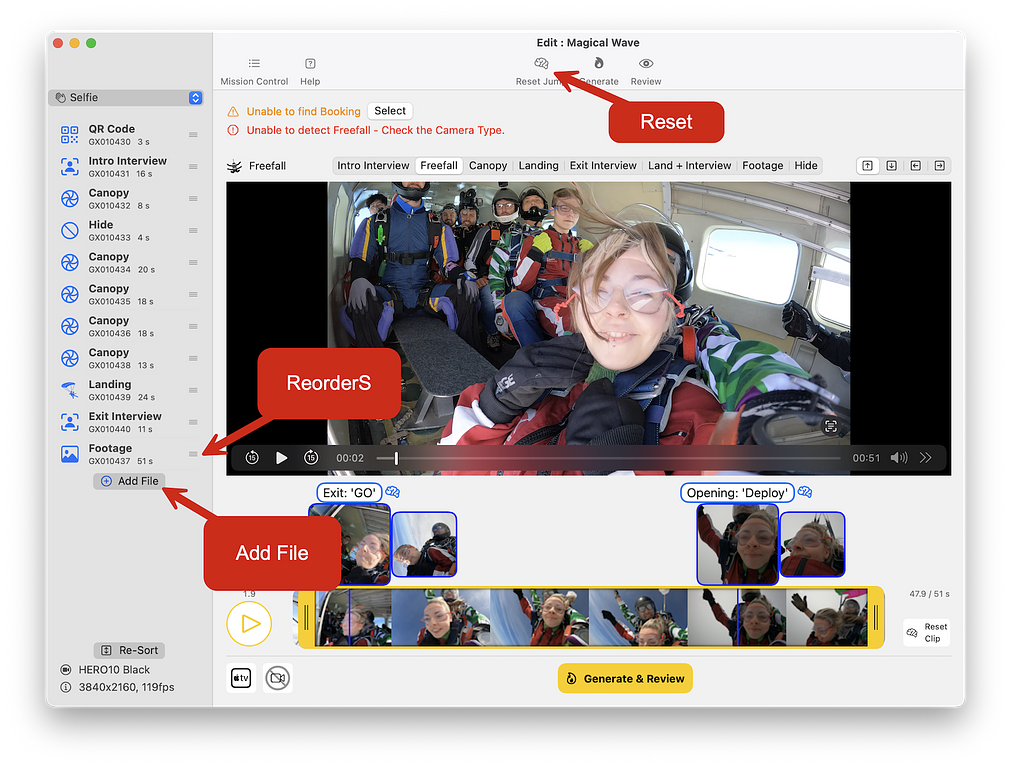
Adding Clips to an Edit
Use backup footage if camera fails, or add cool additional shots
How to add clips to your edit.
If you had a camera failure, but you have a backup
Or if there is something cool that you want to add to the edit...
- Make sure the clips you want have been imported already.
(they don't have to be in a jump though) - Click Add File
- Select the clip you want from previous imports
- Drag clip to the correct position
- If appropriate - click 'Reset Jump' to allow the computer to figure out the edit with the new clip(s)
- Alternatively - manually set the clip types
- Generate and Review
Video: Adding Clips
See also: Manual Editing Level 2 — Add File